


So you want to know how to make a secret board on Pinterest? AMAZING! Secret boards are super easy to set up and more useful than you might think. Whether you’re organizing content behind the scenes, collaborating with a client, or just keeping things *hush-hush* until you’re ready, secret boards about to be your new favorite thing.
In this post I’m walking you through exactly how to make a board secret, how to share secret boards with collaborators, and a few ways creative business owners can use them to their advantage.
Let’s get going!
What is a Secret Board on Pinterest?
🤫 In case you didn’t know, a secret board is literally what it sounds like: a Pinterest board that only you (and anyone you invite) can see.
It doesn’t show up on your profile, it doesn’t appear in search results, and no one who comes across your account will even know it exists. Everything you save to it is completely private until you decide otherwise.
When to Use a Secret Board for Your Business
You may be thinking, “Why in the world would I ever need to make a secret board? Shouldn’t I want people to see my pins?!”
Short answer: Yes, you want people to see your pins.
Longer answer: You may want to use secret boards strategically to hide your pins forever or before you send them out into the world.
Let’s talk about a few reasons you may want to make a secret board for your business:
🎨 Client Mood Boards: If you’re a photographer, designer, stationer, or really any creative who works with clients, secret boards are perfect for creating mood boards. You can save color palettes, font inspo, and photos all in one place. Plus, you can share the board directly with your client for feedback (or even have your client pin their ideas, too).
👵 Old Boards: Back in the day, business owners would often curate their Pinterest boards to align with their ideal clients’ interests. However, current best practice is to only create boards that align with the content you blog about. This way, it’s crystal clear to the algorithm exactly what you do. If you’ve got old, irrelevant boards (that you don’t want to delete yet), just make them secret!
📝 BTS Planning: If you’re using Pinterest for business, odds are you’ll come across some ideas you’d like to pin. However, . may not apply directly to your ideal client.
That’s where secret boards come in. You can save ideas for future blog posts, product launches, or content without cluttering your business boards or confusing the algorithm.
How to Make a Secret Board on Pinterest
New Boards
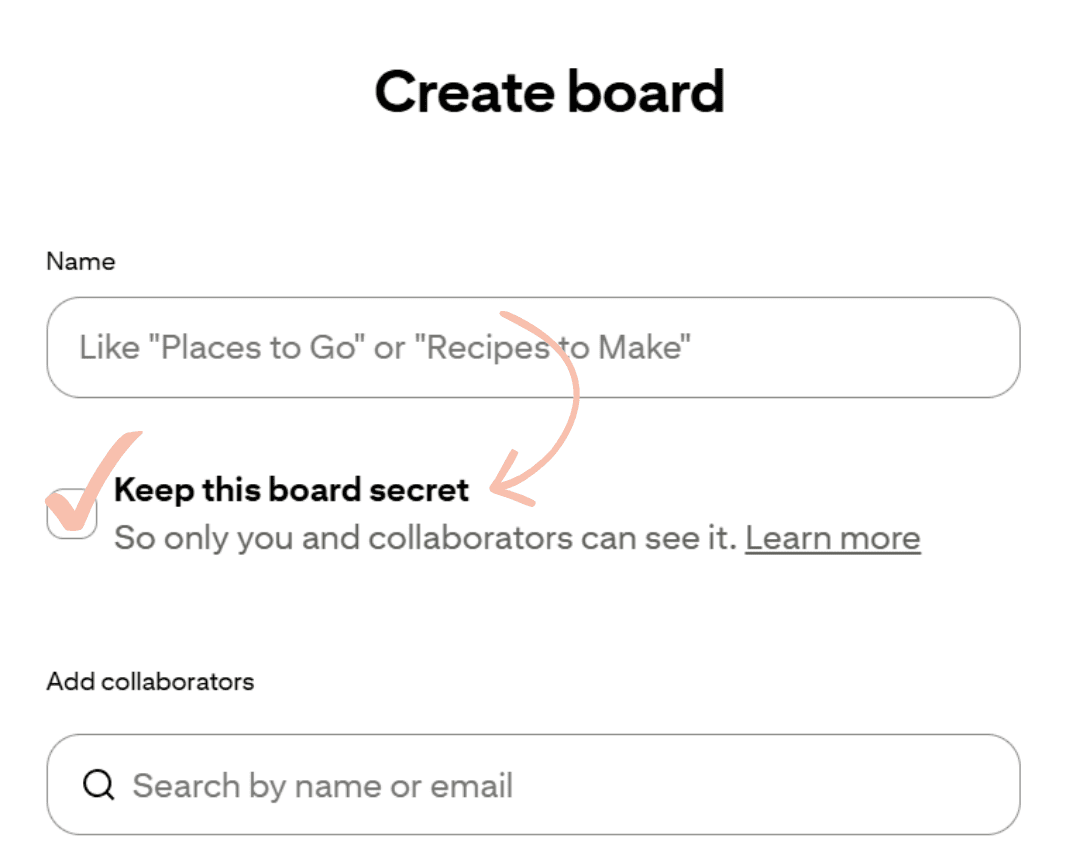
- Log into your Pinterest account and click the red Create button to create a new board.
- Give your board a name.
- Before you hit create, check the “Keep this board secret” option.
- Click “Create” and you’re done. Your new board is private and only visible to you.
Existing Boards
Already have a public board you want to convert? I’ve got you!
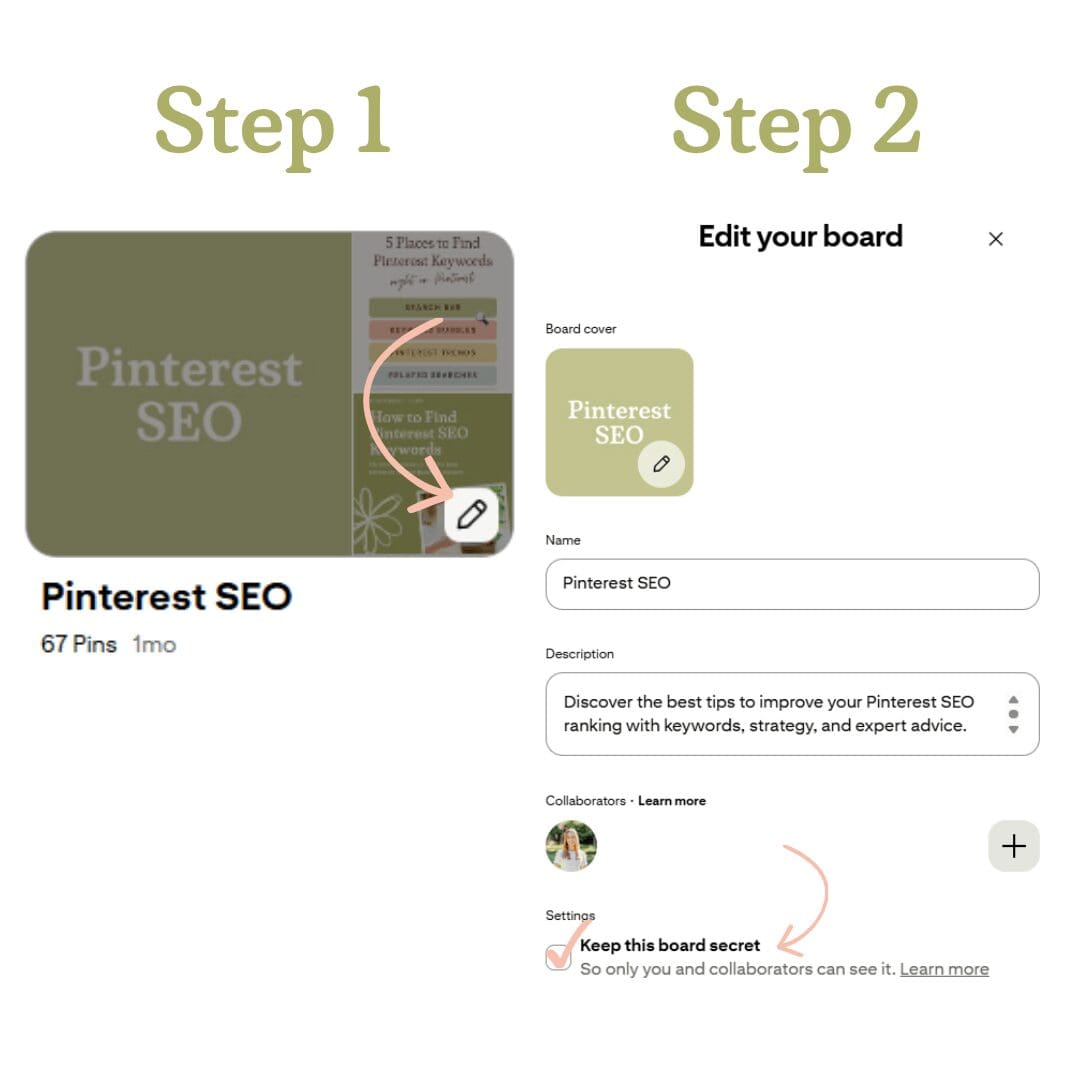
- Go to your profile Saved tab and hover over the board you want to make secret.
- Click the pencil icon to edit the board.
- Check the “Secret” option.
- Save your changes.
That’s it! The board will disappear from your public profile immediately.
Don’t have a business account yet? Here’s why you need one and how to create one step-by-step.
How to Share a Secret Board on Pinterest
A cool thing about secret boards is that you don’t have to keep them all to yourself. You’re still able to invite other Pinterest users to any secret board. That makes them super useful for things like client work, mood boards, or any other collaboration.
💡 To share a secret board, open the board and click the pencil icon to edit it. From there you’ll see an option to invite collaborators. Type in the email address or Pinterest username of the person you want to add and send the invite. Once they accept, they’ll be able to view and save pins to the board just like you can.
Want to learn more about boards? I created a complete Pinterest boards guide to help answer your questions!
Start Taking Advantage of Secret Boards
Secret boards are a simple feature with a lot of practical uses, especially if you’re a creative business owner who works closely with clients or has a lot going on behind the scenes. Now that you know how to create them, convert existing boards, and share them with others, go put them to work!
If you’re just getting started on Pinterest and want to make sure your account is set up the right way from the beginning, I can help. I offer full-service Pinterest management, strategy calls, and account optimization services. Whatever stage you’re at, there’s a way I can help.
Check out my Pinterest services to learn more!
FAQs about How to Make a Secret Board on Pinterest
Are secret boards visible to followers?
Secret boards are not visible to your followers. Only you will be able to see them when you are logged into your business account.
Can other people see secret Pinterest boards?
Other people cannot see your secret Pinterest boards until you make them public.


+ Show Comments
- Hide Comments
+ add a comment