


As a Pinterest manager who has been on a lot of websites (like a lot a lot), I can confidently say that the majority of creatives are not taking advantage of this one simple way to get more Pinterest traffic: ✨user-created pins✨.
User-created pins are images that a person pins directly from your website while they’re reading your blog post. They bring you free traffic without you having to do (hardly) anything! Today I’m diving into exactly why you need them and how to encourage more people to create them. Let’s get going!
📌 Pin this post for later! (See what I did here?)

Why You Need Pin Images in Your Blog Posts
We’re going to start out with an undeniable truth: Pinterest goes absolutely feral for user-created pins.
Every time someone saves a pin image directly from your website or your blog post, it tells Pinterest that that content is valuable. Pinterest thinks, “Oh, someone liked this post so much that they wanted to save it; that must mean other people will like it too.”
Then what does the algorithm do? It pushes the user-created pin out to even more people.
Lately, user-created pins (or “other pins” in your analytics) hold more weight in the algorithm than pins you create yourself.
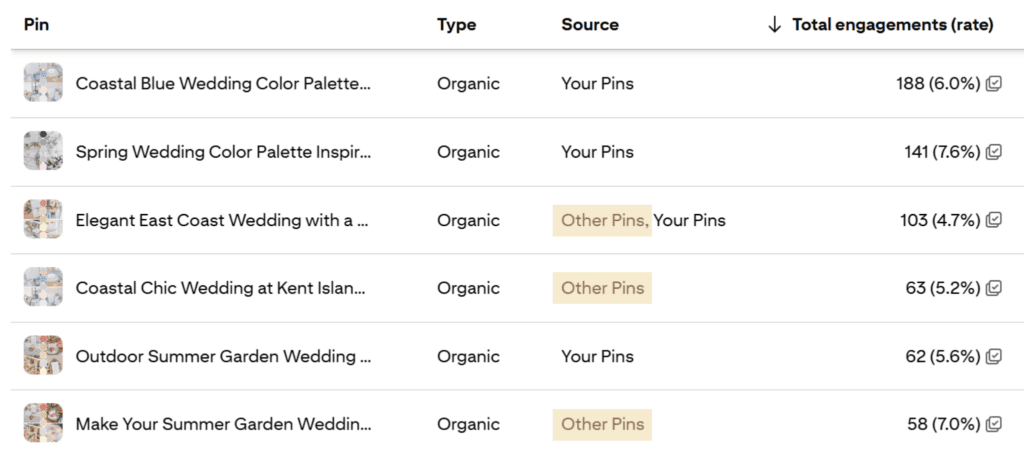
As an example, we can see just how valuable they are for my client in the wedding industry. In the past 30 days, three of her top six pins are “other pins” (i.e., images someone pinned directly from her website).
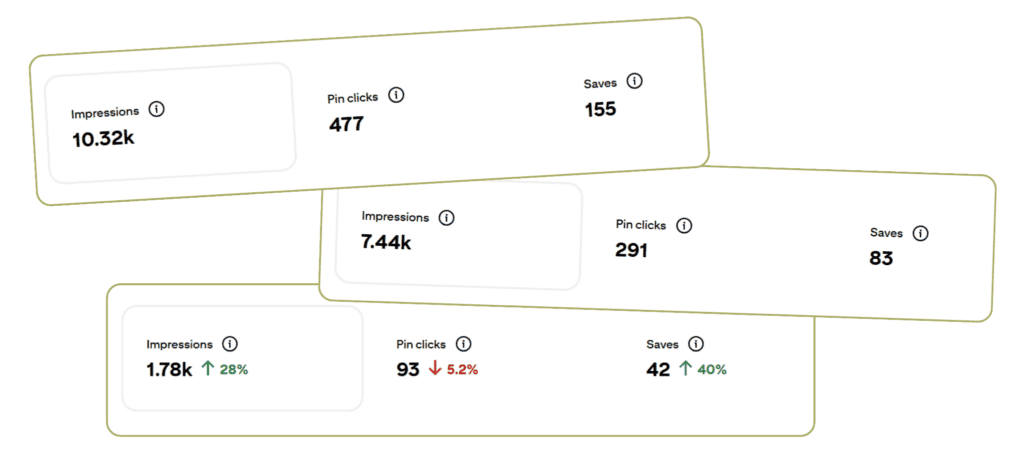
And if we look closer at the stats since those three pins have been created, we’ll see some crazy good numbers.
Those three pins alone drove
- 19.54k views
- 280 saves
- 861 pin clicks
You want to know how we made it happen? By putting a dedicated pin image in my client’s blog posts.
How to Add Pin Images to Your Blog Posts
If you’ve never added a pin to your blog posts before, it’s really simple.
- Head to Canva to create your pin. I’d recommend adding your logo or URL, so people easily know it’s yours.
- Save your image and optimize it so it doesn’t slow down your website. I use TinyPNG or Squoosh.
- Give your image a name, preferably with keywords.
- Add your image towards the top of your blog post. If you make more pins, you can add them throughout for better visibility.
- Include alt text with your image, preferably with keywords.
And that’s literally it. It’ll take all of five minutes to do, and the results will last much longer than that.
Encourage Readers to Pin Your Images
If you’re marketing your business on any platform, you probably already know that engagement doesn’t just magically happen when you want it to. 🦄 Sometimes you have to set the scene and do a little encouraging to get your audience to do what you want!
The same holds true for getting people to pin images from your blog posts. You need to make it clear and easy for them to understand. Here’s how to do that:
Turn on the Pin It Image
You know when you hover over an image and the little Pinterest icon comes up? It’s not something that automatically happens. You have to turn that on. Every website platform is different, so I’d encourage you to search for how-to videos for yours.
If you’re using WordPress like me, here’s what you’ll do:
- Go to your blog dashboard
- Click on Plugins
- Search for the Weblizar Pin It Button
- Follow the steps to activate it
And you’re golden! Now when people hover over your blog post images, they can save them directly to Pinterest with one click.

Add a Call to Action
A call to action, or CTA, is a reminder for what you want people to do.
We’re all super busy, right? We may not always be thinking Hey, I should pin this post when we’re reading blogs. That’s why we need to make it very plain what we want with a CTA.
Try adding phrases like
- Pin this for later
- Save this post!
- 📌 Pin it
You can add these above or below your pin image as a reminder for what you want readers to do.
FYI: If you go back to the top of this page, you’ll notice I practice what I preach. In almost every single blog post I write, I add a pin with a clear call to action towards the beginning of the post.
Start Getting More Traffic from Pinterest
Easy peasy, right? Adding dedicated pin images to your blog posts is one of my favorite ways to get more Pinterest traffic without doing (hardly) any work. The payoff is huge, and the amount of businesses out there doing this is staggeringly low. Give it a try, and I guarantee your reach will grow.
Don’t feel like doing it yourself? I offer both Pinterest management and blog writing services. When you book with me, I’ll do it for you. 😉 Reach out today to get started!


+ Show Comments
- Hide Comments
+ add a comment