


If you’re searching for the best blog platform for your creative business, you’re in the right place. Your business might already have a website or maybe you’re starting from scratch. Either way, someone told you should be blogging, and now you need to pick a platform. UGH.
Here’s where I’ll save you a few hours of research…
➡️ The best blog platform for creative businesses is WordPress, when you pair it with Showit. That’s the answer! (You can close out the 12 tabs you’ve got open comparing platforms. 😉)
I’ve been using WordPress for years. I host my own blog on it, most of my clients use it, and I truly love working with it. If you’re looking for the best platform for a blog that’s going to actually grow your business, this is it.
Below, I’ll walk you through why WordPress + Showit is the best combo for creative businesses like yours, plus a few things to keep in mind before you start.
📌 But first, pin this post for later!
WordPress: The Best Blog Platform for SEO (and Design)
If you’ve ever opened a blog tutorial and immediately gotten overwhelmed, I get it. Been there. Picking a blog platform can feel like a freaking research project. But after years of working with Showit + WordPress, it’s now the only combo I recommend for creative businesses.
Here’s how Showit explains the combo: Showit handles the design, WordPress handles the blog. So you design how your blog looks in Showit, and then publish your posts through WordPress.
Here’s why I love it:
1. You Have Full Control Over SEO
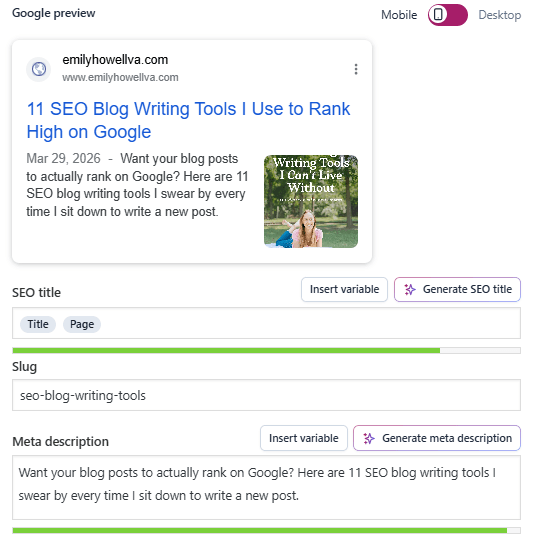
Titles, meta descriptions, URLs, image alt text… WordPress lets you tweak every single one for every single post. Each of these things provide data to Google. And that data helps Google to decide who to show your post to. With WordPress you have full access to all the tools in an easy location.
Check out what my SEO tools look like when I write blog posts on WordPress:
2. It’s Easy to Use
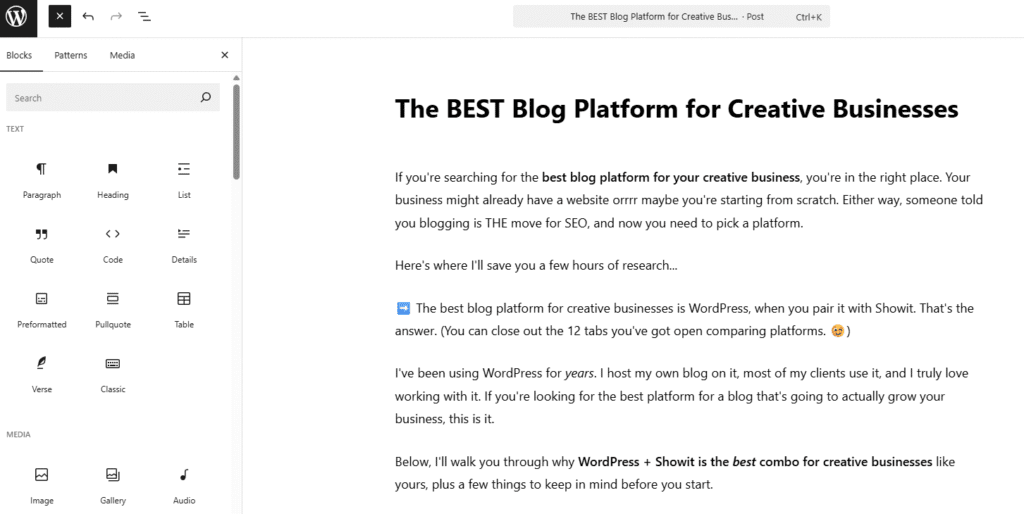
I know “WordPress” can sound intimidating. But really, once you’re inside the dashboard, writing a blog post looks a lot like a Google Doc. You type, you add blog images, and you hit publish. Very easy.
Check out what my screen looks like as I draft this blog post:
3. Your Blog ✨Perfectly✨ Matches the Rest of Your Site
This is the beauty of the Showit side of the combo. Your blog isn’t some random template slapped onto an aesthetic website. It uses the same fonts, colors, and design elements as the rest of your site. That way, everything feels cohesive.
Whichever Showit template you’re using should come with a blog template as well. You can customize everything there, right in your Showit website editor.
Don’t believe me? Compare my WordPress blog to the rest of my site. Seamless. Pure perfection. 🌈
4. It Displays Your Galleries Beautifully
If you’re a wedding stationer, photographer, or any other creative who wants to publish blogs with your portfolio images, WordPress works for that, too! (I’m talking both desktop AND mobile versions.)
Here are a few examples of real wedding blogs I’ve written that prove it.
The SEO Plugin That Makes WordPress the Best Blog Platform for Beginners
WordPress works so well for SEO because of plugins. Plugins are basically little add-on tools that make your blog smarter. The one I install first for every one of my clients is called Yoast. It’s a free plugin (though there is a paid version), and it’s great for beginners.
Here’s how it works:
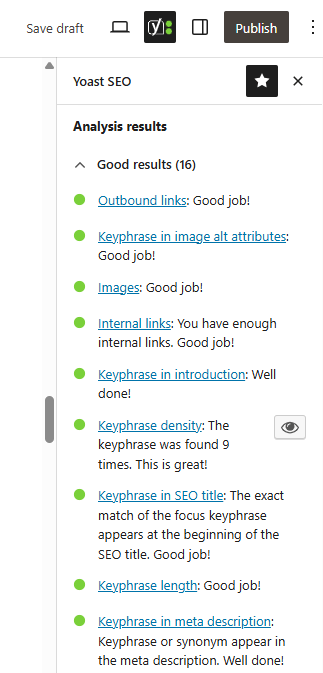
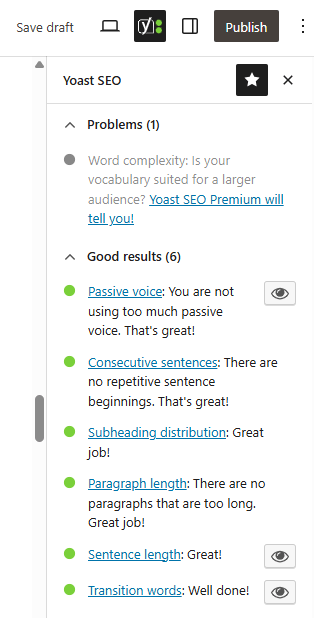
You type in your focus keyword (the phrase you want your post to rank for), and Yoast analyzes your post for two things: SEO and readability. Each one gets a color-coded score, red, orange, or green, like a cute lil stoplight 🚦 telling you when your post is ready to go.
It’s nice because Yoast appears as a sidebar as you’re editing your blog. While you type, it makes adjustments. Check out what my Yoast looks like:
Yoast Teaches You SEO as You Go
One of the things that makes Yoast amazing for beginners is that it helps you learn SEO terms. All of the categories it analyzes have hyperlinks (see the pictures above). Those hyperlinks take you to blog posts that explain exactly what you need to do for SEO. So if you’re confused about why you need internal links, what a meta description is, or why you need a keyword in your subheading, it’ll teach you.
I have the free version, and it’s got everything beginners need. However, if you’re more serious about SEO and want to make things a little easier, the premium version has some nice upgrades. Two upgrades I loveee in Yoast Premium: internal linking suggestions and the table of contents creator.
If you’re interested in blogging, but don’t yet know a ton about SEO, Yoast will make it so much easier!
What It Costs to Run Showit + a WordPress Blog
The good news: Showit + WordPress is one of the more affordable options out there for what you get. The cost isn’t going to wreck your budget.
Showit has three tiers, but only two of them include the WordPress blog:
- Showit & Basic Starter Blog: $27/month (billed annually): This is the one most creatives need. It comes with a WordPress blog, basic plugins to make it work (including Yoast for SEO), up to 10K blog visits per month, and daily backups. This is what I and many of my clients use.
- Showit & Advanced Blog: $39/month (billed annually): This is the upgraded tier. It lets you install custom plugins, handles up to 25K monthly visits, and gives you unlimited WordPress users. Unless you’re already blogging at a high volume or have specific plugin needs, you probably don’t need this one starting out.
The third tier is Showit on its own ($22/month). It doesn’t include the WordPress blog, though, so we’ll skip over it for the purpose of this post.
If you want to take it for a spin around the block, here’s my referral link for a free month of Showit. It’s longer than the standard 14-day trial Showit offers, so you get extra time to poke around the dashboard and see if it’s a good fit.
The Truth About Blogging
Picking the right platform is the easy part. Actually blogging for your business? That’s where things get a little harder.
Here’s what writing a blog post typically looks like: keyword research, writing the post, formatting it inside WordPress, optimizing it with Yoast, adding internal links, picking and editing the images, hitting publish, and then doing it all again next week. And the week after that. And the week after that.
The other thing to note is the timeline. SEO is a long game. You’re probably not going to see real traffic for 6 to 12 months of consistent posting. Some posts might take even longer to start ranking. This is totally normal. It’s also why many business owners give up on blogging right before it would have started working for them.
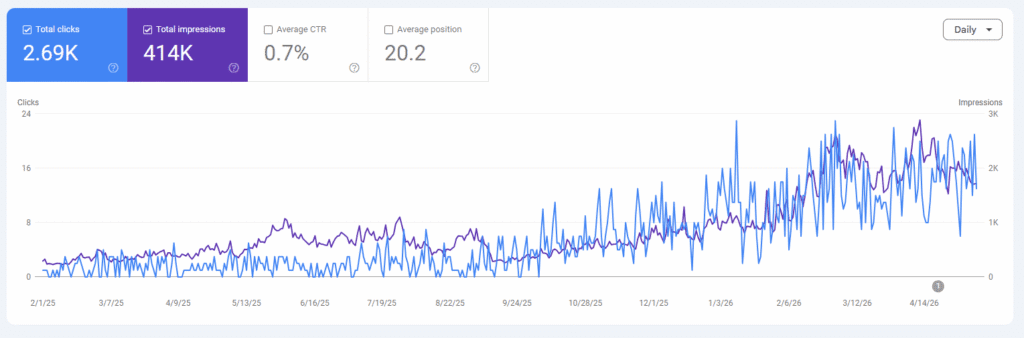
I’m not telling you this to talk you out of starting a blog. I’m telling you because you should know what you’re signing up for. Blogging works. It just doesn’t always work fast, and it doesn’t work without effort.
If that effort sounds like something you’d rather hand off to someone else, make sure you read until the end!
FAQs About Choosing the Best Blog Platform
What Is the Best Blog Platform for Beginners?
The best blog platform for beginners is WordPress, especially when paired with Showit. WordPress handles the SEO side of things, while Showit gives you a drag-and-drop website builder so you can design your site without any code. Together, they make a beginner-friendly setup.
Where Can I Find a Blog Platform with Built-In SEO Tools?
A blog platform with built-in SEO tools is Showit paired with WordPress. The Showit & Basic Starter Blog plan includes the Yoast SEO plugin pre-installed, which gives you SEO analysis and readability scoring on every blog post you publish. You don’t need to install anything extra or pay for additional SEO subscriptions.
Can I Move An Existing Blog Over to WordPress?
Yes, you can move your existing blog to WordPress. If you sign up for Showit’s Advanced Blog plan, the migration is free and includes your posts, images, and comments. The process usually takes a few days, and Showit’s team handles it for you. You won’t lose any of your existing content during the switch.
Prefer to Outsource Your Blog Writing?
Here’s the thing about blogging: even with the best platform in the world, somebody still has to write the posts. Somebody still has to research the keywords, figure out formatting, optimize for search engines, add the internal links, and publish the post.
That somebody can be you. Orrrrr that somebody can be me. 👋
I write SEO-optimized blog posts for creative business owners who want all the benefits of blogging without having to add “blogger” to their job description. You can focus on your creative work, and I’ll make sure your blog is bringing the right people to your website.
If that sounds like a good trade, check out my blog writing services here or contact me to get started!


+ Show Comments
- Hide Comments
+ add a comment