


Pinterest is so much more than a place to go to find recipes—it’s a powerful visual search engine. And we know that just like Google, search engines run on a little something called ✨keywords✨. If you’re using Pinterest to market your business, keywords are your secret weapon to make sure your content reaches the right audience. But where do you find them? In this guide I’m breaking down some of my favorite methods (as a Pinterest manager) for how to find Pinterest keywords.
📌 Pin this guide for later!
1. The Pinterest Search Bar
The easiest place to start when hunting for keywords is the Pinterest search bar. It’s right at the top of the page and gives you a direct insight into what Pinterest users are actively searching for.
Here’s how to use it:
🔎 Start by typing a word related to your niche into the search bar. In my example below, I typed “fall”. As you type, Pinterest will automatically suggest related terms.
Take note of these suggestions. They’re popular search terms that you can incorporate into your pin descriptions, board titles, or even your profile.
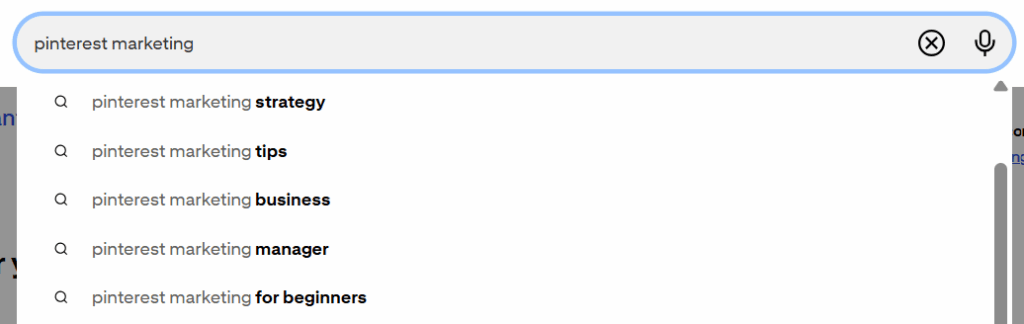
Try typing in variations of your keywords to see different suggestions. For example, if you’re a wedding planner, you might search for “wedding planning” or “planning a wedding”.
These keyword suggestions are a great way to figure out with Pinterest users are looking for and adjust your strategy accordingly.
2. Keyword Bubbles
Once you’ve entered a search term in the Pinterest search bar, you’ll often notice a series of keyword bubbles appearing underneath. These colorful bubbles suggest more specific or related topics based on your initial search.

🫧 Clicking on these bubbles will lead you to even more specific searches. These terms are my favorite way to find long-tail keywords (phrases that are more specific and, therefore, generally less competitive).
Keyword bubbles help you refine your strategy and drill down into niche topics that align with your audience’s interests. They also provide inspiration for new content ideas that can keep your Pinterest boards relevant and engaging.

3. Pinterest Trends
Pinterest Trends is a neat tool that shows what’s currently popular across the platform. It’s especially useful if you’re looking for seasonal or timely content ideas.
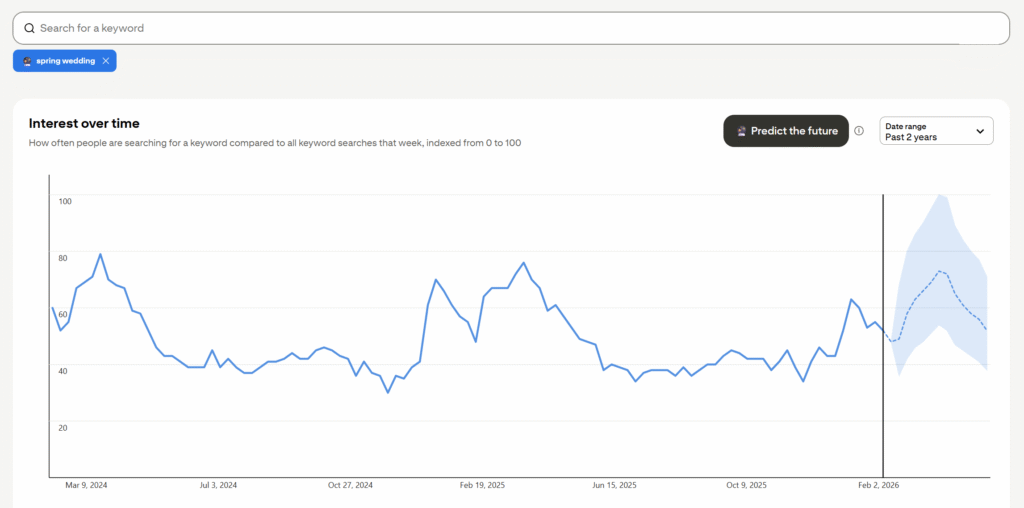
📈 To find Pinterest Trends, go to trends.pinterest.com and explore the trending keywords in different categories. You can use this tool to find both trending or seasonal keywords to incorporate into your pins. Search by monthly, yearly, growing, or seasonal trends, depending on your goal.
Here’s an example of how I use Trends for my wedding vendor clients. Based on this data, I know that March is the peak time people are searching for “spring wedding” ideas. That means I’ll want to start pinning at least 3 months before to give the algorithm time to do its thing.
4. Look at Your Competitors
A little competitor research can go a long way in finding great keywords. Look at what other businesses in your niche are doing on Pinterest. Check out their boards, pins, and descriptions. Which keywords are they using consistently?
👀 Pay attention to the topics they cover and how they structure their pin titles and descriptions. You can even use Pinterest’s search bar to find their pins by typing in keywords you think they might be using.
While you definitely don’t want to copy them, this research can give you inspiration and ideas for keywords you might not have thought of yet. It also helps you identify gaps in your competitors’ strategies where you could offer your own unique content.
CAUTION: There are many successful Pinterest accounts that are using outdated practices like hashtags or keyword stuffing. Don’t be fooled into thinking that you need to do it too! Make sure to use current best practices for Pinterest.
5. Analyze Pinterest Search Results
Another easy way to discover relevant keywords is to analyze the search results themselves. Once you’ve typed a keyword into the search bar, take a look at the top pins that appear. These are ranking in Pinterest’s algorithm, which means they’re likely using strong, high-performing keywords.
🕵️♀️ Click on some of these pins and check out their titles and descriptions. What keywords do you see? What phrases are repeated across multiple top-ranking pins? These can be clues for what works and how you can incorporate similar keywords into your own pins and boards.
How to Find Pinterest Keywords for Your Business
Finding the right keywords on Pinterest is so important for getting your work in front of the right audience. Whichever strategy you use, there are plenty of ways to discover the best keywords for your business. By using these methods, you’ll improve your SEO and start reaching more people who are searching for you. So, start exploring, testing, and refining your keyword strategy today! And remember, if you ever need help with Pinterest, I’m here to support you! Reach out to get started.
Now that you know where to find them, check out my guide on how to add keywords to Pinterest!
📌 Pin this guide for later!



+ Show Comments
- Hide Comments
+ add a comment